

Register meeting proxies
A co-owner who cannot attend the general meeting can delegate their voting rights to another person — either another co-owner or an external third party. Registering proxies before the meeting ensures the attendance list is complete, signatures are clearly assigned, and the meeting can start efficiently.
Why register proxies in advance?
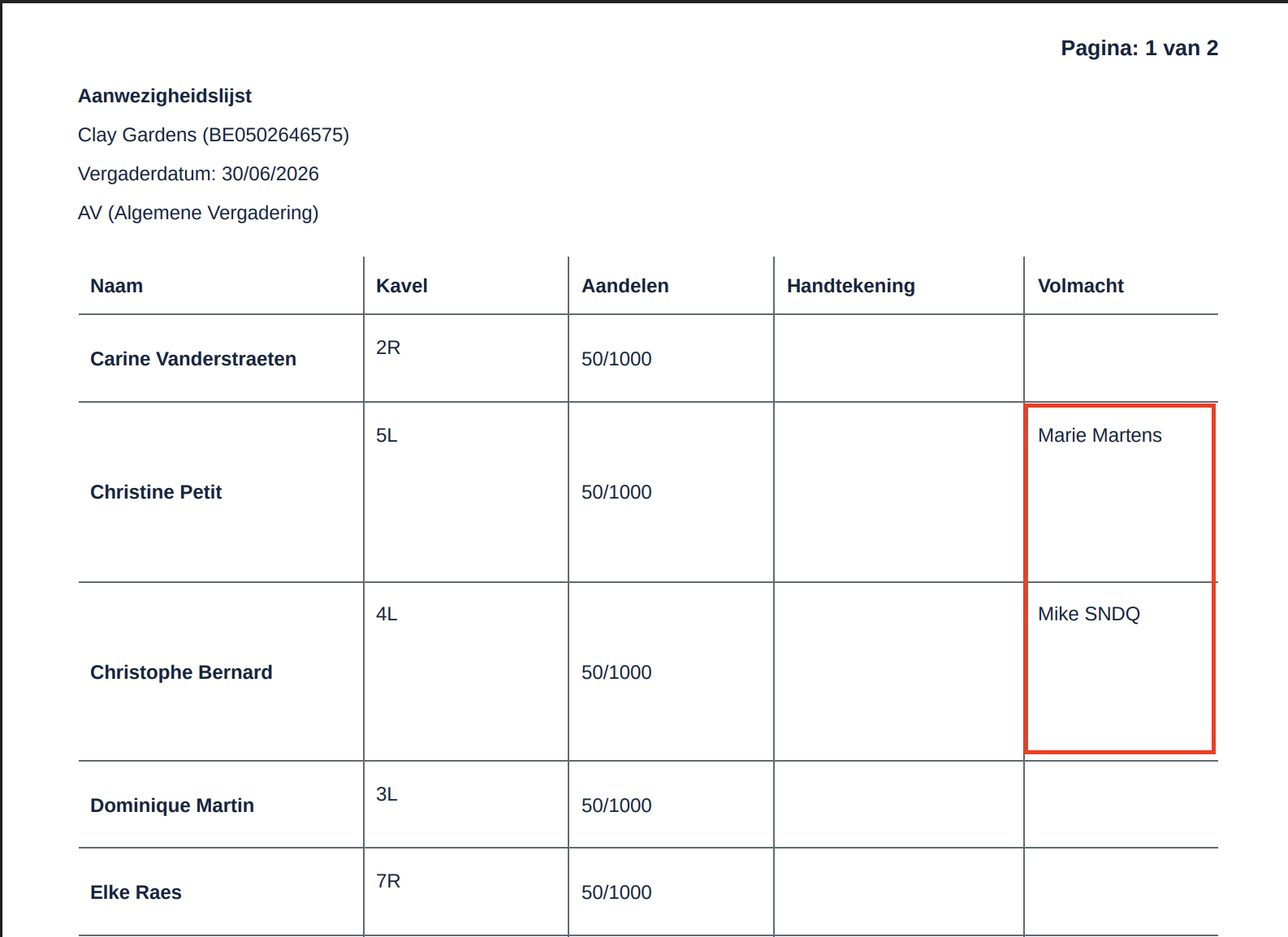
At the start of a general meeting, things are usually quite hectic. By registering proxies beforehand, the proxy holder automatically appears in the Proxy column next to the proxy giver on the attendance list. This makes it immediately clear where signatures are required — saving time and reducing confusion for both the syndic and the attendees.
Video — Register meeting proxies
Navigate to proxy registration
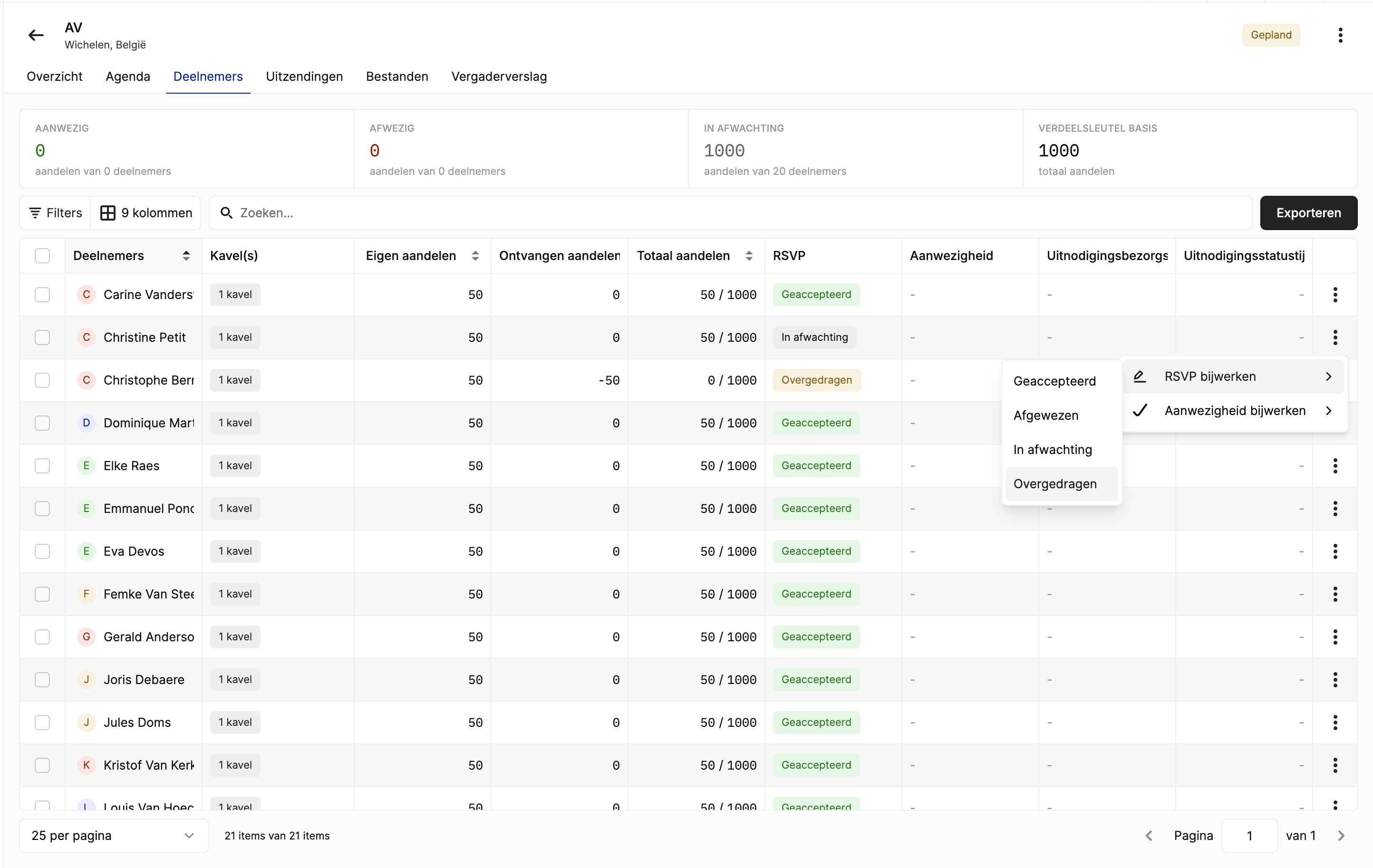
Go to the meeting → Participants tab. The participant list shows all co-owners with their shares, RSVP status, and attendance information.
Register a proxy
Step 1: Select the absent owner
Find the co-owner who will be absent. Click the three-dot menu (⋮) on their row, then select RSVP bijwerken → Overgedragen (Transferred).
Alternatively, right-click the participant row to access the context menu.
Step 2: Choose the proxy holder
A transfer panel opens with two tabs:
| Tab | Description |
|---|---|
| Co-owner | Transfer shares to another co-owner of the building. The dropdown shows all co-owners with their share count. |
| Others | Transfer shares to an external person who is not a co-owner (e.g. a family member, lawyer, or neighbor). |
Transfer to a co-owner
- Select the Co-owner tab
- Choose the receiving co-owner from the dropdown (e.g. "Marie Martens (100 aandelen)")
- Optionally upload a proof document (written proxy authorization)
- Click Save
Transfer to an external proxy
- Select the Others tab
- Fill in the proxy holder's details:
| Field | Required |
|---|---|
| First name | Yes |
| Last name | Yes |
| No | |
| Phone | No |
- Optionally upload a proof document
- Click Save
Step 3: Verify the transfer
After saving, the participant list updates:
- The absent owner's RSVP changes to Transferred (orange label)
- Their Received shares column shows a negative value (e.g. -50)
- Their Total shares changes to 0 / 1000
- The proxy holder's Received shares increases accordingly
How proxies appear on the attendance list
When you export the attendance list as PDF, proxy holders automatically appear in the Proxy column next to the proxy giver. This makes it clear at a glance:
- Which co-owners gave a proxy
- Who is holding each proxy
- Where signatures are required
TIP
Print the attendance list before the meeting starts. The proxy column is pre-filled, so proxy holders know exactly where to sign on arrival.
Belgian proxy rules
Belgian co-ownership law (Article 3.87) sets limits on how many proxies one person can hold:
| Rule | Description |
|---|---|
| Maximum 3 proxies | Each co-owner can receive shares from a maximum of 3 other owners |
| 10% exception | If total voting power (own + received shares) is 10% or less of total building shares, more than 3 proxies are allowed |
| 50% voting power cap | No single person may hold more than 50% of total building shares through their own shares combined with received proxies |
The system validates these rules automatically. If a transfer would violate these limits, it is rejected with a clear error message.
WARNING
A note is shown in the transfer panel: "Each co-owner can receive a maximum of 3 proxies." The system will block transfers that exceed Belgian law limits.
Undo a proxy transfer
To undo a proxy transfer:
- Click the three-dot menu (⋮) on the transferred participant
- Change their RSVP status back to Accepted or Pending
- The shares are automatically returned and the proxy relationship is removed
Good to know
- Register proxies before the meeting — they appear automatically on the printed attendance list.
- Proof documents — upload a written proxy authorization as evidence (recommended per Belgian law).
- External proxies are meeting-only — they are not added to your contact book.
- Co-owner transfers require acceptance — the receiving owner must have accepted the invitation first.
- Proxies affect voting weight — the proxy holder votes with their combined shares (own + received).
Related articles
- Manage meeting participants
- Export attendance list
- Record votes
- Send meeting invitations
- Generate meeting report
Need help?
Contact our team at info@sndq.be or use the Get Help option in the SNDQ application.