

Create a distribution key
A distribution key defines how building costs are divided among owners. Each cost category (e.g. cleaning, elevator maintenance, insurance) can be assigned a different distribution key, ensuring that owners pay their fair share based on their ownership quotas as defined in the base deed.
Why is it important?
| Impact | Description |
|---|---|
| Cost allocation | Determines how much each owner pays for shared building costs |
| Legal compliance | Must reflect the quotas in the building's base deed |
| Fairness | Allows different cost types to be split differently (e.g. elevator costs only for units with elevator access) |
| Budget | Provisions are calculated based on distribution keys |
| Cost settlement | Annual cost settlement uses distribution keys to allocate actual costs |
Video — Create a distribution key
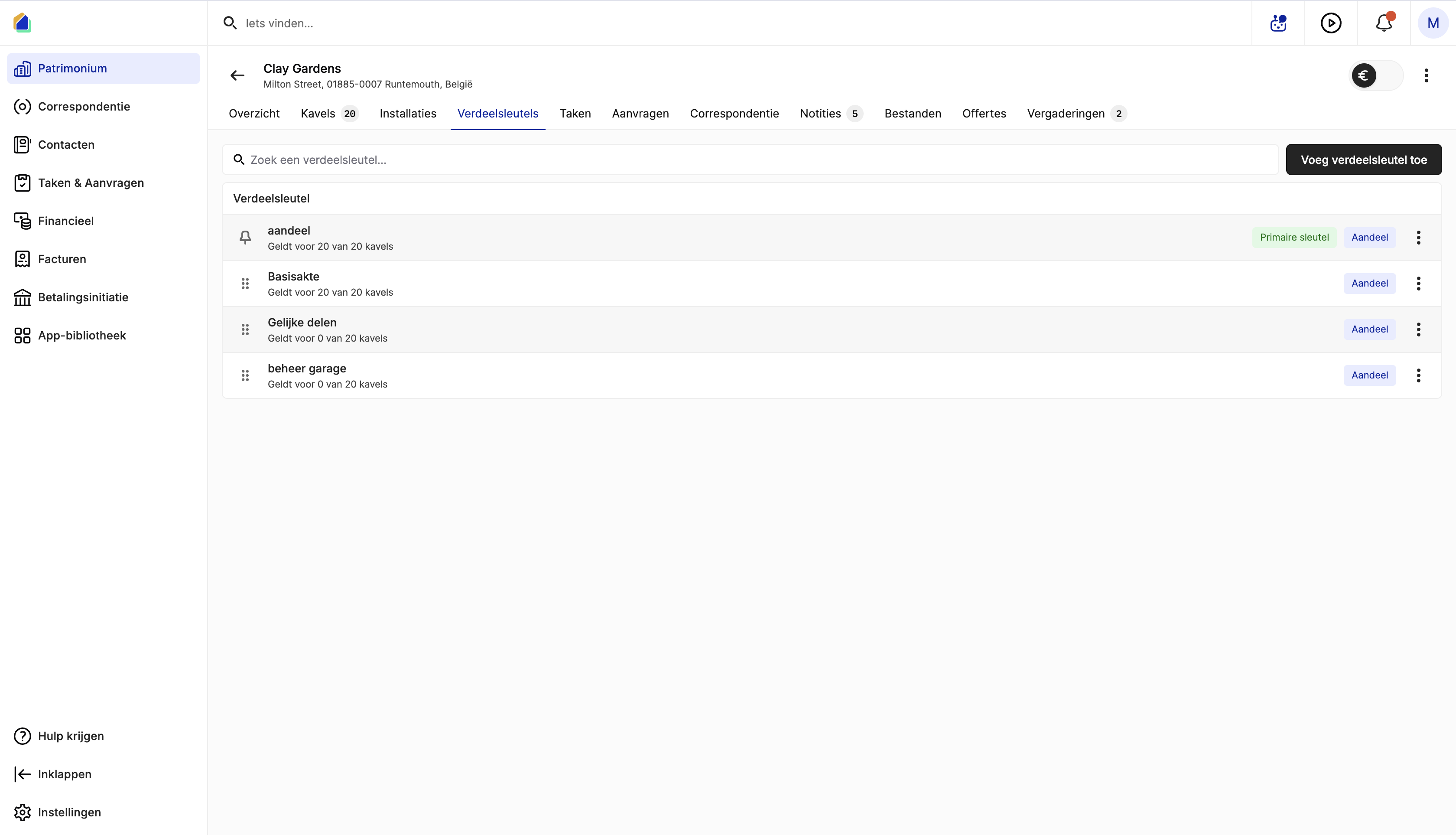
Navigate to distribution keys
Go to Patrimony → select the building → click the Distribution keys tab.
The list shows all existing distribution keys:
| Column | Description |
|---|---|
| Name | Name of the distribution key (e.g. "aandeel", "Basisakte", "Gelijke delen") |
| Applies to | How many units it applies to (e.g. "Applies to 20 of 20 units") |
| Primary key | Indicates if this is the primary key |
| Type | Share-based |
Create a new distribution key
Click Add distribution key in the top-right corner. Enter a name for the key (e.g. "Basisakte", "Gelijke delen", "beheer garage").
Distribution mode
Choose how shares are displayed and calculated:
| Mode | Description |
|---|---|
| Percentage | Shares expressed as percentage (e.g. 5%) — total must equal 100% |
| Basis | Shares expressed as fractions of a base number (e.g. 50/1000) — total must equal the base |
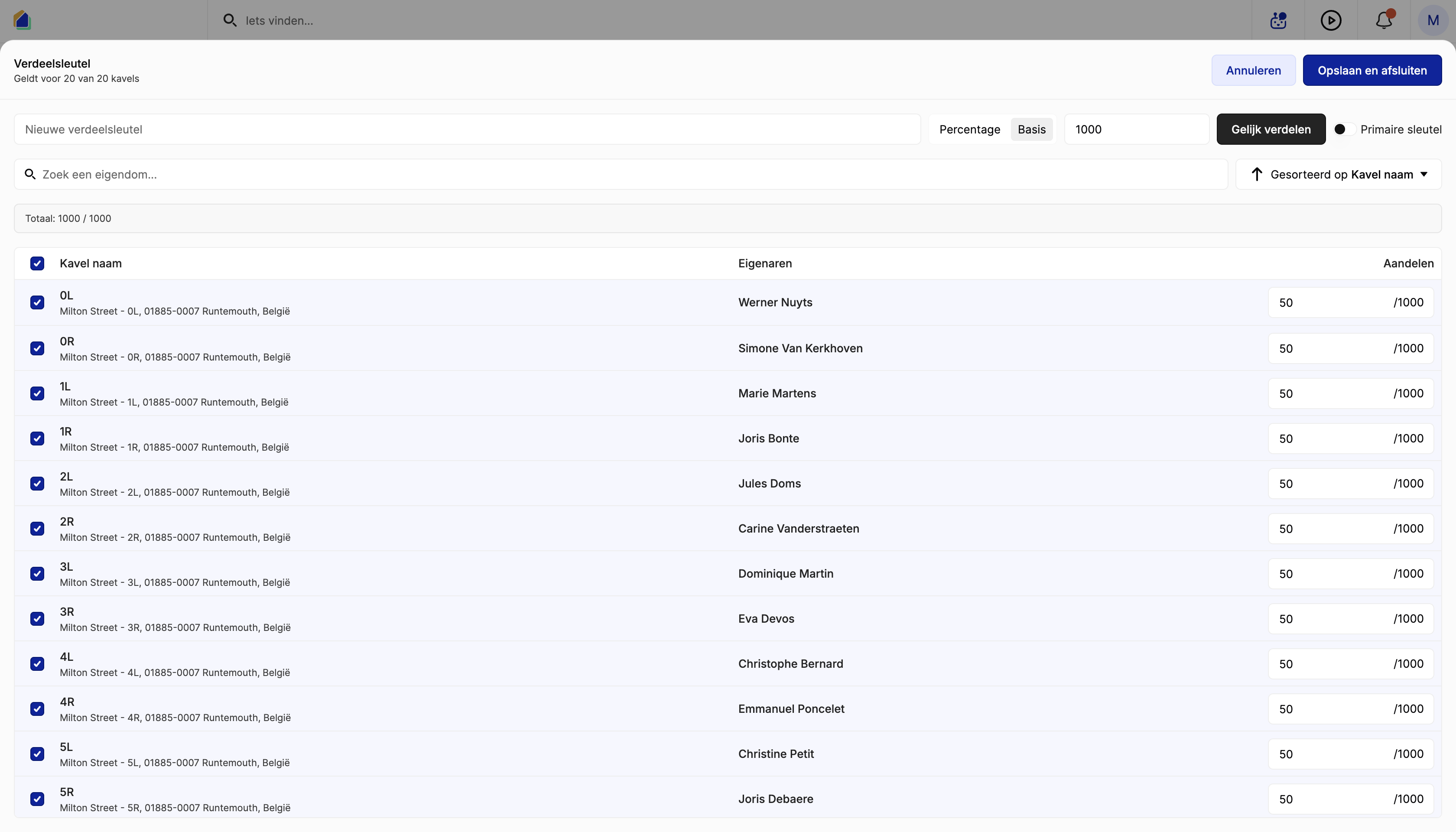
Basis mode — set the base number (e.g. 1000). Each unit's share is a fraction of this base. The counter shows the current total vs. the expected total (e.g. "Total: 1000 / 1000").
Percentage mode — each unit's share is expressed as a percentage. The total must equal 100%.
Assign shares to units
For each unit, the editor shows:
| Column | Description |
|---|---|
| Unit name | Unit name and address |
| Owners | Current owner of the unit |
| Shares | Share assigned to this unit |
Manual entry — enter the share for each unit individually. The shares must match the quotas defined in the building's base deed.
Equal distribution — click Split evenly to automatically divide shares equally among all selected units (e.g. 1000 ÷ 20 units = 50/1000 each).
Include or exclude units
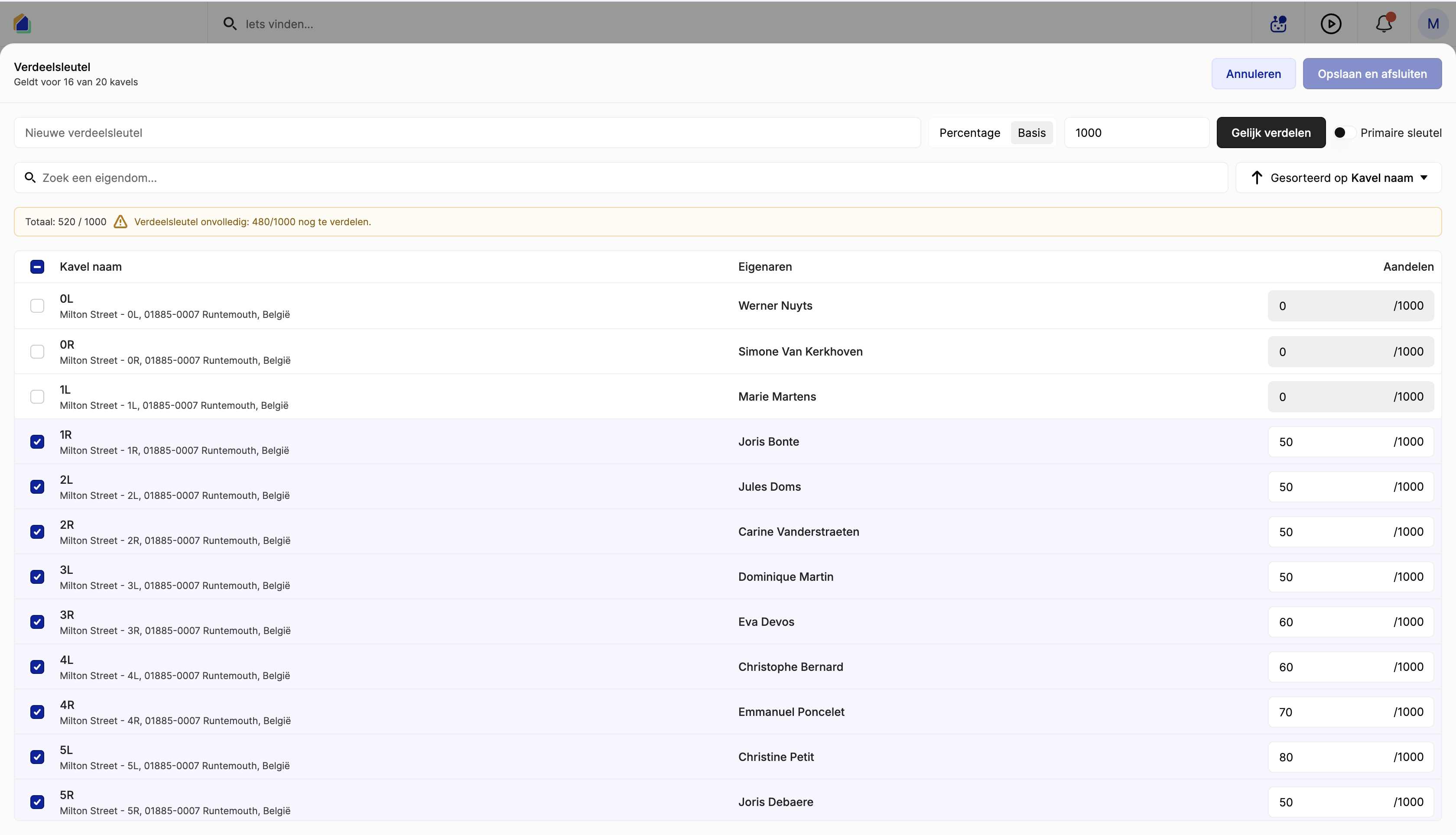
Use the checkbox next to each unit to include or exclude it from this distribution key. Unchecked units have a share of 0 and are not charged for costs using this key. This is useful when certain costs only apply to specific units (e.g. garage costs only for units with a garage).
Primary key
Toggle Primary key to mark a distribution key as the default for the building. The primary key is used when allocating costs that don't have a specific key assigned.
Validation
Before saving, the system validates that the total is correct:
| Validation | Description |
|---|---|
| Total matches base | In Basis mode: total of all shares must equal the base number |
| Total equals 100% | In Percentage mode: all shares must add up to 100% |
| Warning if incomplete | If the total doesn't match, a warning appears (e.g. "Distribution key incomplete: 480/1000 still to distribute") |
Click Save and close to save the distribution key.
Common distribution key examples
| Name | Use case | Typical setup |
|---|---|---|
| Basisakte / Aandeel | General common costs (insurance, management fees) | Based on quotas from the base deed — primary key |
| Gelijke delen | Costs shared equally (e.g. general meeting costs) | Equal share per unit |
| Lift | Elevator maintenance and repair | Only units with elevator access included |
| Garage | Parking/garage costs | Only units with garage access included |
| Tuin | Garden maintenance | Only ground-floor units or units with garden access |
Good to know
- Base deed — the quotas in the distribution key must match the official quotas defined in the building's statutes. These are legally binding.
- Multiple keys — a building can have multiple distribution keys, each used for different cost categories.
- Partial keys — not all units need to be included. Deselect units that should not participate in a specific cost type.
- Total must balance — the sum of all shares must equal the base or 100%. The system warns you if the total is incomplete.
- Impact on existing allocations — changing a distribution key affects future cost allocations. Existing allocations are not retroactively changed.
- One primary key — only one key can be marked as the primary key.