

Reject a Peppol invoice
When you receive a Peppol invoice that is incorrect, not recognized, or cannot be processed, you can reject it directly from the Peppol Inbox. The rejection is sent back to the supplier via the Peppol network.
When to reject
- Invoice contains incorrect information (wrong amount, VAT, dates)
- Supplier or service is not recognized
- Duplicate invoice already processed
- Goods or services were not delivered as expected
- Invoice was sent to the wrong party
- Peppol invoice for bank costs from your bank (see Handle bank costs)
How to reject
Open the Peppol Inbox
Navigate to Invoices > Peppol Inbox and click on the invoice you want to reject.
Click Reject
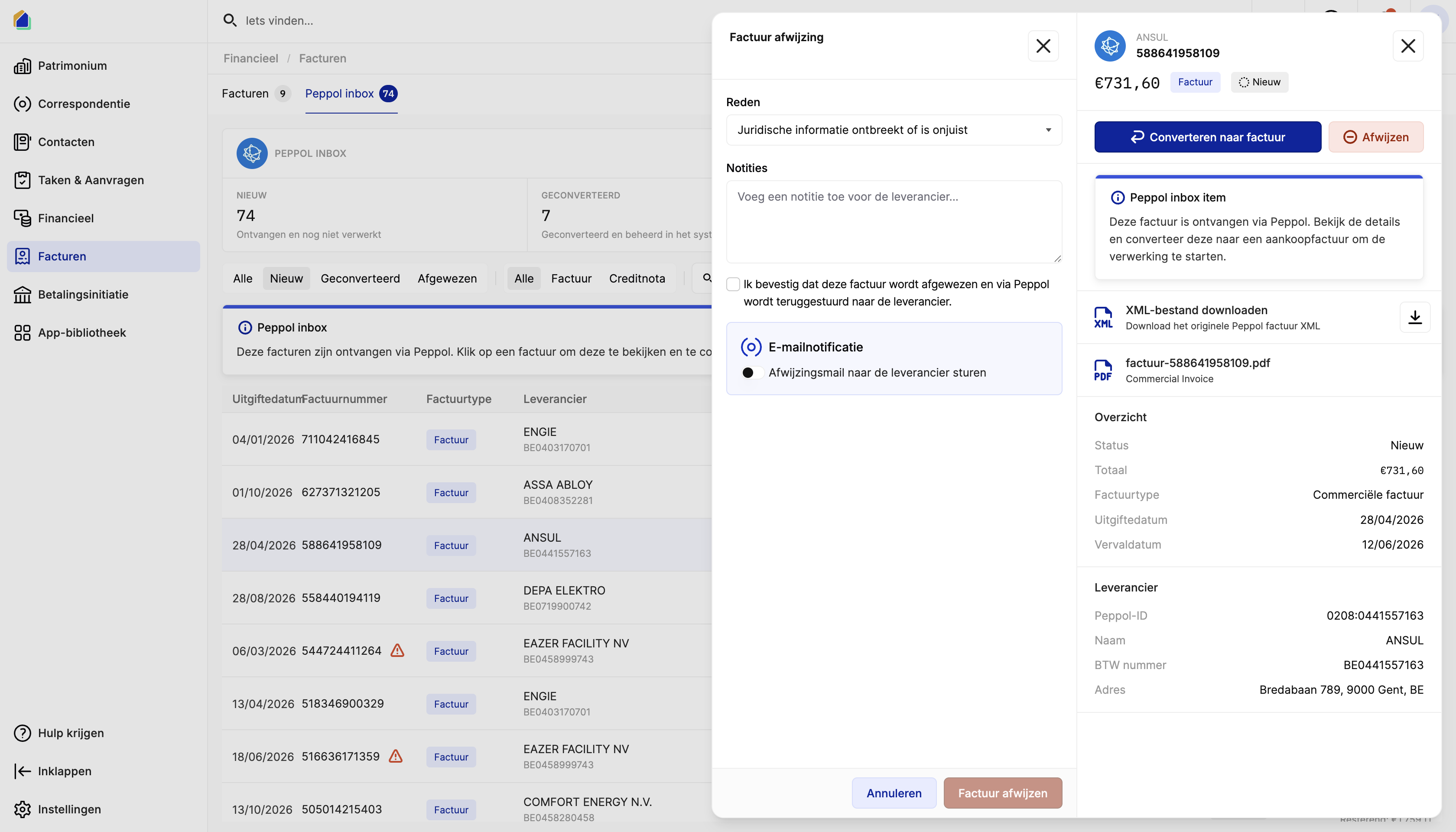
Click the red Reject button in the top right of the detail panel. A rejection dialog opens.
Select a rejection reason
Choose the appropriate reason from the dropdown:
| Reason | When to use |
|---|---|
| Reference document missing or incorrect | Wrong invoice number, missing PO reference |
| Legal information missing or incorrect | Wrong VAT number, missing legal entity info |
| Party is not known | Unknown supplier, wrong recipient |
| Quality of goods/services not as expected | Service or product quality issues |
| Delivery-related issue | Not delivered, wrong delivery, damaged goods |
| Price discrepancy | Amount doesn't match agreement or quote |
| Quantity discrepancy | Wrong quantities invoiced |
| Item identification issue | Wrong items or item codes |
| Payment terms or method issue | Wrong IBAN, incorrect payment terms |
| Transaction not recognized | No knowledge of this transaction |
| Financial issue | Budget issues, account problems |
| Invoice has been partially paid | Already partially settled |
| Other reason | Any other reason not listed above |
Add a note
Write a clear explanation in the Notes field so the supplier understands what needs to be corrected.
Confirm the rejection
- Check the confirmation box to confirm the rejection will be sent via Peppol.
- Click Reject invoice.
Video — Full flow: reject a Peppol invoice
What happens after rejection
- The invoice status changes to Rejected in your Peppol Inbox.
- A rejection message is sent to the supplier via the Peppol network with your reason and note.
- The rejected invoice remains visible under the Rejected filter tab for audit purposes.
Email notification to the supplier
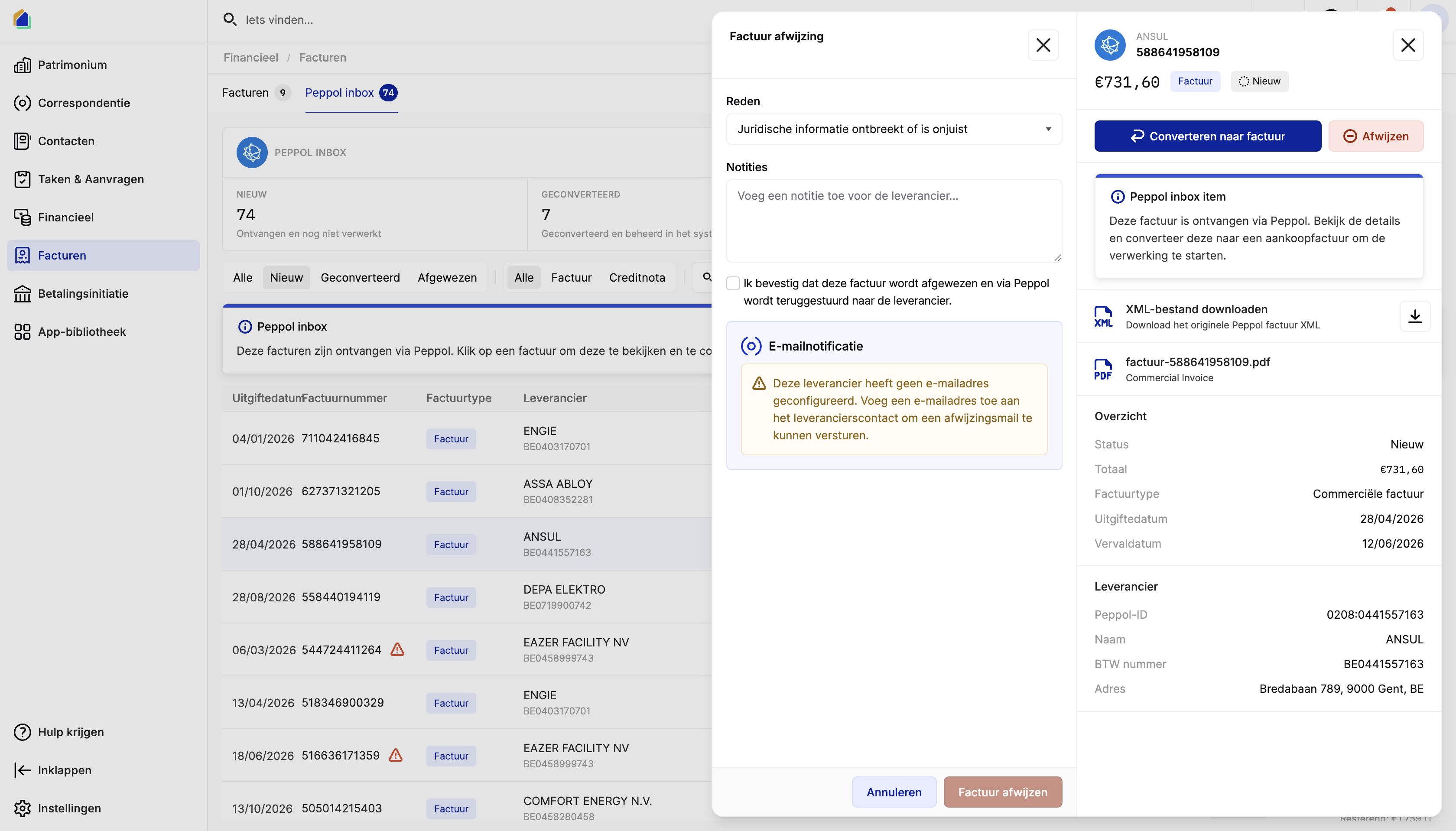
After rejecting, SNDQ can also send an email notification to the supplier.
- Supplier has an email configured — you can send a rejection email directly. A correspondence form opens where you select the template type Contact and compose or select a template.
- Supplier has no email — a warning is shown. You can still reject via Peppol, but no email will be sent. Add an email to the supplier's contact to enable this.
Use a rejection email template
To avoid writing the rejection email from scratch each time, create a reusable template in Settings > Templates with type Contact. You can use Peppol invoice variables (invoice number, supplier name, rejection reason, etc.) to auto-fill the content. See Manage templates for details.
Video — Send rejection email to supplier
Related articles
Need help?
Contact our team at info@sndq.be or use the Get Help option in the SNDQ application.