

Handle bank costs
Bank costs are small amounts your bank deducts on outgoing payments (for example SEPA transfer fees) or charges periodically via a fee statement. In SNDQ, you do not need to book these as supplier invoices.
What are Peppol invoices for bank costs?
Some banks (such as ING) now send Peppol invoices for bank fees. These are not regular supplier invoices for your HOA — they are administrative documents from the bank itself.
Do not convert in SNDQ
We recommend not saving Peppol invoices for bank costs in SNDQ. The cost is already reflected in your bank payments.
Why not book them as invoices?
| Issue | Explanation |
|---|---|
| Incomplete coverage | The bank does not send a Peppol invoice for every bank fee. You might have 10 fee transactions but only receive 4 Peppol invoices. |
| Double booking | If you convert the Peppol invoice and also book the bank payment separately, you risk processing the cost twice. |
| Not a real supplier invoice | These are internal bank charges, not expense documents you need to settle separately with owners. |
How SNDQ processes bank costs
SNDQ automatically recognizes bank costs from bank data (CODA codes) when your bank statement is imported. The payment is booked to:
65000000 — Bank charges and debt charges
You do not need to create or pay an invoice for this.
What you see in SNDQ
- Under Financial > Accounts, the bank fee appears as an outgoing payment (negative amount).
- After automatic recognition, SNDQ shows a Bank cost badge on the payment.
- The journal entry debits account 650 and credits your bank account (551).
No action needed in most cases
If your bank statement is up to date and the payment was recognized as a bank cost, you do not need to do anything.
When SNDQ does not recognize a bank cost yet
Sometimes the system does not recognize a fee yet, for example when the bank returns incomplete or unusual data. Our team continuously updates recognition rules so these payments are still booked automatically.
Check Financial > Accounts > To process tab for any remaining open bank fees.
Manual booking via a miscellaneous entry
If a specific bank fee was not recognized automatically and remains open, you can book it manually via a free entry.
Step 1: Open a miscellaneous booking
- Go to Financial and select the building.
- Open Miscellaneous bookings.
- Click New booking > Free entry (advanced).
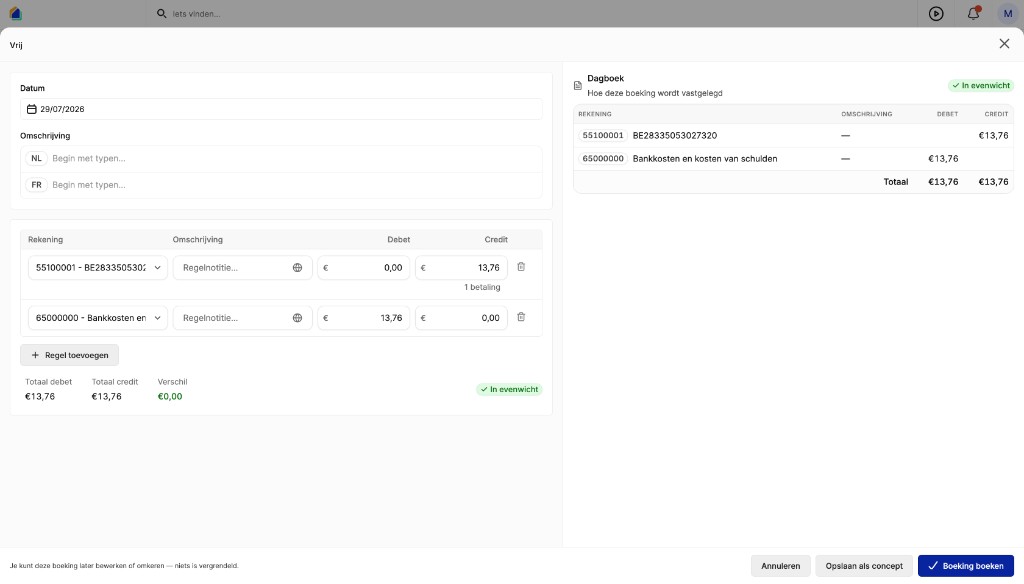
Step 2: Fill in the journal entry
Add two lines:
| Account | Debit | Credit |
|---|---|---|
| 551 — building bank account | bank fee amount | |
| 65000000 — Bank charges and debt charges | bank fee amount |
Verify the entry is In balance.
Step 3: Link the bank payment
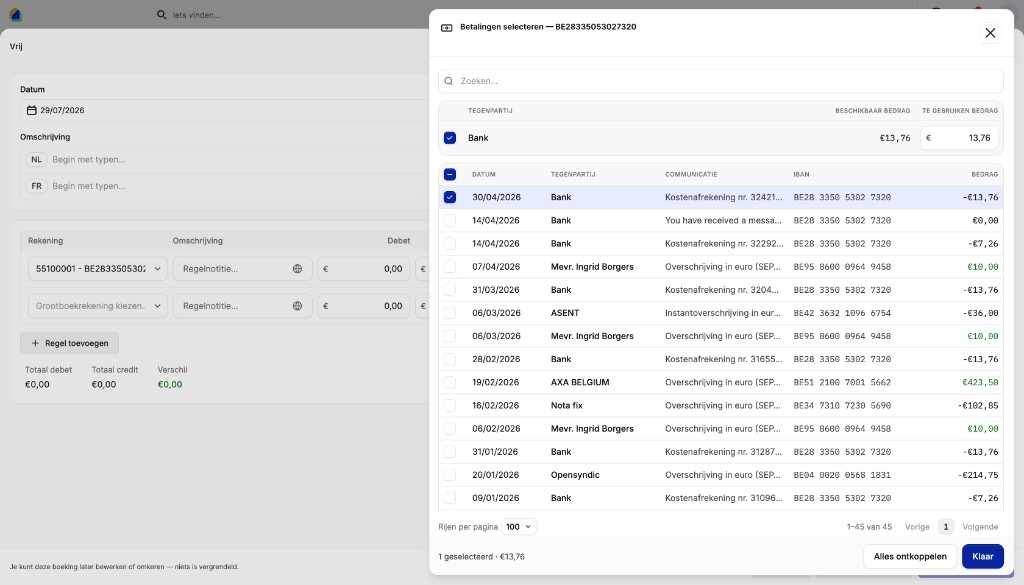
- Click the bank account line (551).
- Choose Select payments.
- Select the open bank fee transaction (for example Kostenafrekening).
- Click Done.
Step 4: Post
Click Post booking to save the journal entry.
Reject Peppol invoices
When new Peppol invoices for bank costs arrive:
- Go to Invoices > Peppol Inbox.
- Open the bank invoice (for example ING BELGIE NV).
- Click Reject and choose an appropriate reason (for example Transaction not recognized or Other reason).
See Reject a Peppol invoice for the full walkthrough.
Already converted by mistake? Clean up
If you already converted Peppol invoices for bank costs into purchase invoices, delete them to avoid duplicate costs.
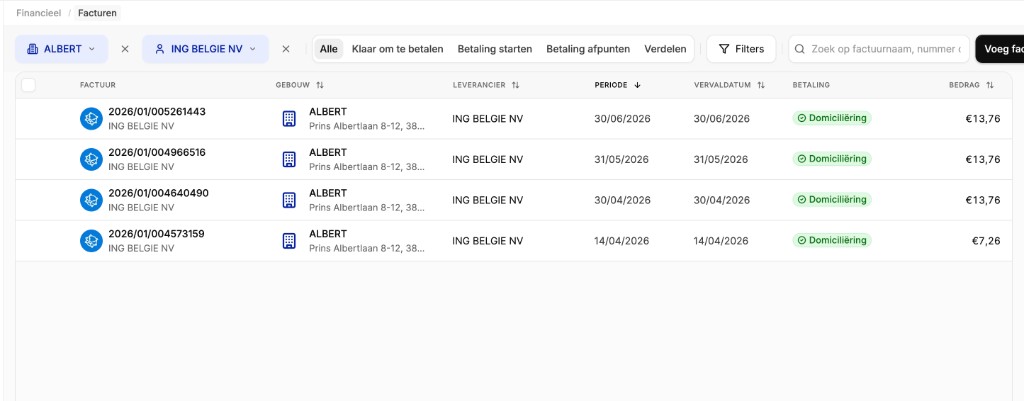
For each invoice:
- Open the purchase invoice.
- Click Actions > Cancel direct debit (if applicable).
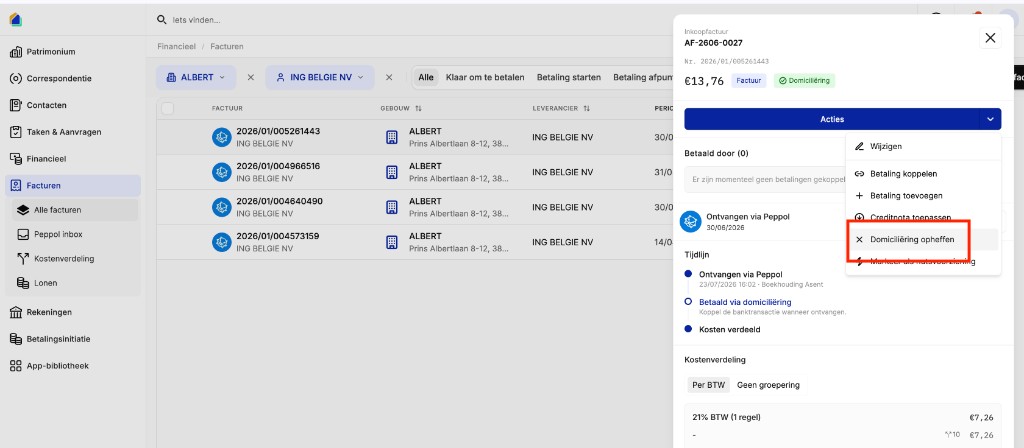
- Click Actions > Delete and confirm.
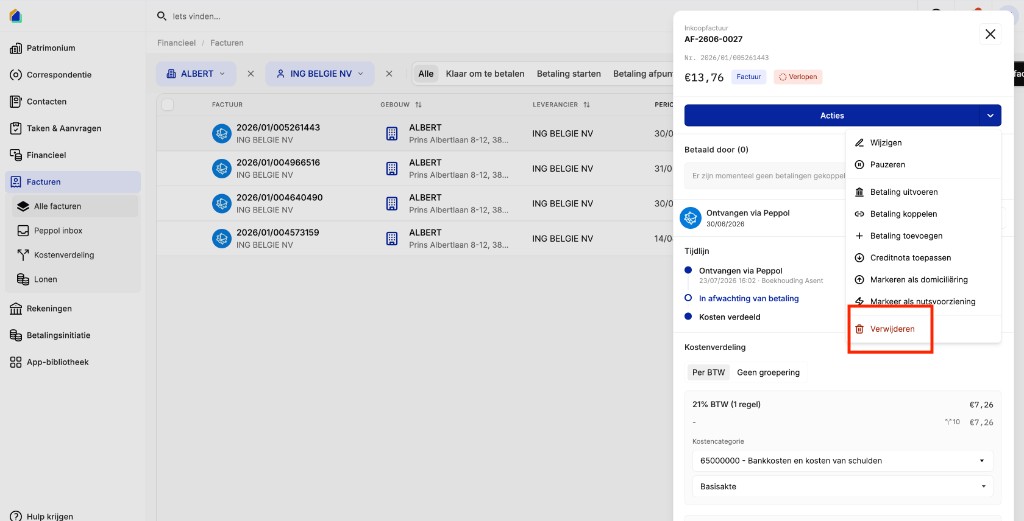
Delete blocked?
If deletion fails because payments are linked, unlink them first. See Delete a purchase invoice for all scenarios.
Going forward: reject new Peppol invoices for bank costs. The underlying fees are handled through bank payments.
FAQ
Do I need to book bank costs as invoices?
No. Do not book bank costs as supplier invoices. SNDQ processes them through the bank payment on account 650.
Why am I receiving Peppol invoices from my bank?
Banks now send Peppol invoices for administrative purposes. That does not mean you need to include them as purchase invoices in your accounting.
What if the amount is €0.00?
Some banks send Peppol invoices with a €0.00 amount. You can safely reject these in the Peppol Inbox.
How do I check if bank costs are already booked?
Go to Financial > Accounts, open the building bank account, and filter on To process. Booked bank costs show the Bank cost badge and are no longer open.
Related articles
Need help?
Contact our team at info@sndq.be or use the Get help option in the SNDQ application.