

Assign a payment
When tenants transfer rent or charges to your bank account, incoming payments appear in your Accounts overview. You need to assign (match) each incoming payment to the correct payment request in SNDQ. The system can automatically suggest matches based on structured communication (OGM), or you can search and assign payments manually.
TIP
The better your tenants follow the correct payment communication (OGM), the more accurate the automatic suggestions will be — saving you significant time.
How automatic matching works
SNDQ uses a smart matching algorithm to suggest the most likely payment request for each incoming transaction:
| Matching criteria | Weight | Description |
|---|---|---|
| Structured communication (OGM) | Highest | If the tenant uses the exact OGM code, the system matches with high confidence (90%+) |
| Amount | High | The transferred amount is compared to open payment request amounts |
| Sender IBAN | Medium | The sender's bank account is matched to known tenant contacts |
| Sender name | Medium | The name on the transaction is matched to tenant contact names |
| Timing | Low | Recent payment requests due around the payment date are prioritized |
What is OGM?
OGM (Overschrijvingsformulier met Gestructureerde Mededeling) is a Belgian structured communication format — a unique payment reference like +++441/8131/83787+++. Each payment request generated from a lease has its own fixed OGM code. When the tenant uses this code in their bank transfer, the system knows exactly which payment request it belongs to.
Open a transaction to assign
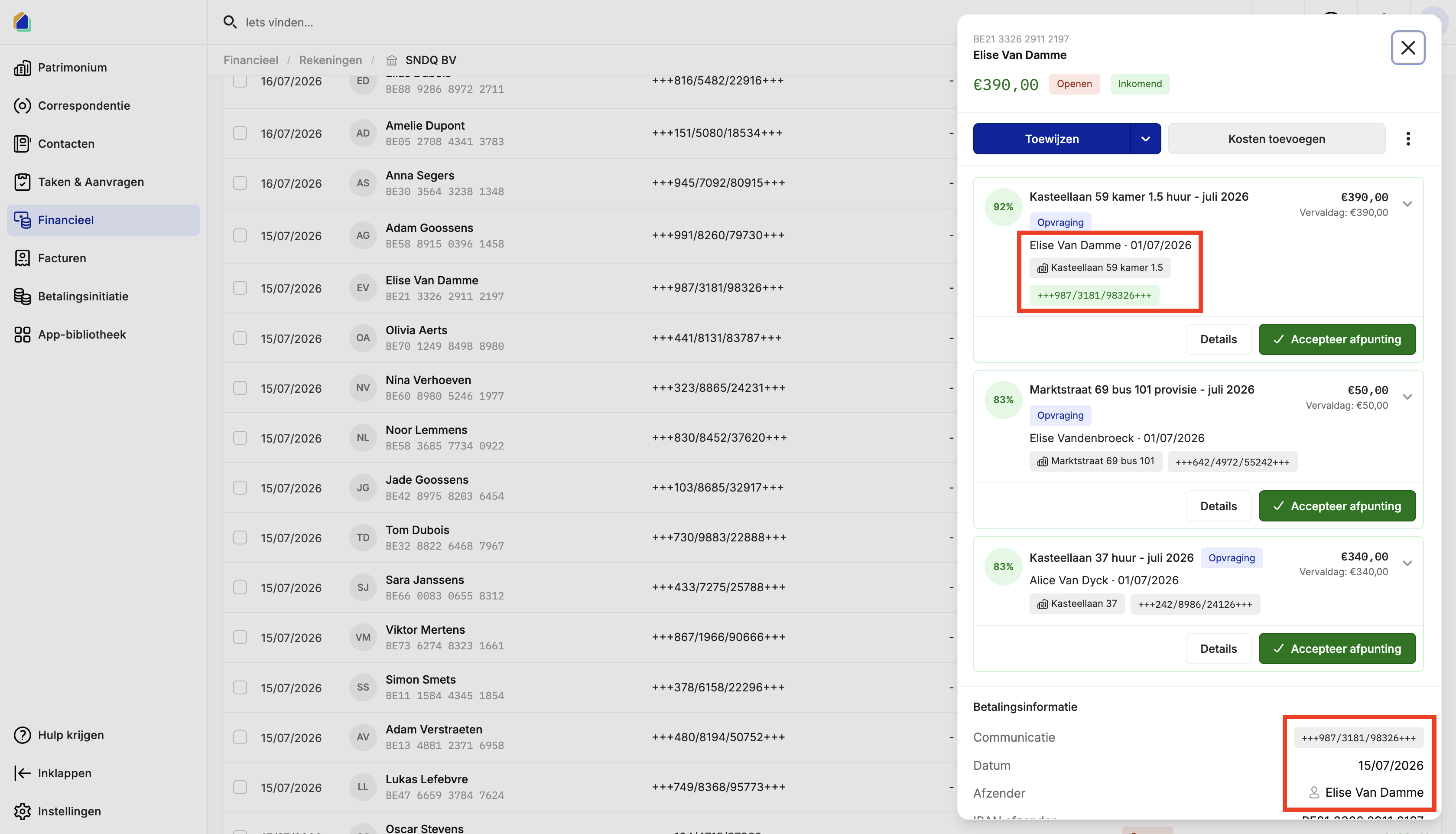
Go to Financial > Accounts and select your bank account. Click on an incoming transaction to open the detail panel.
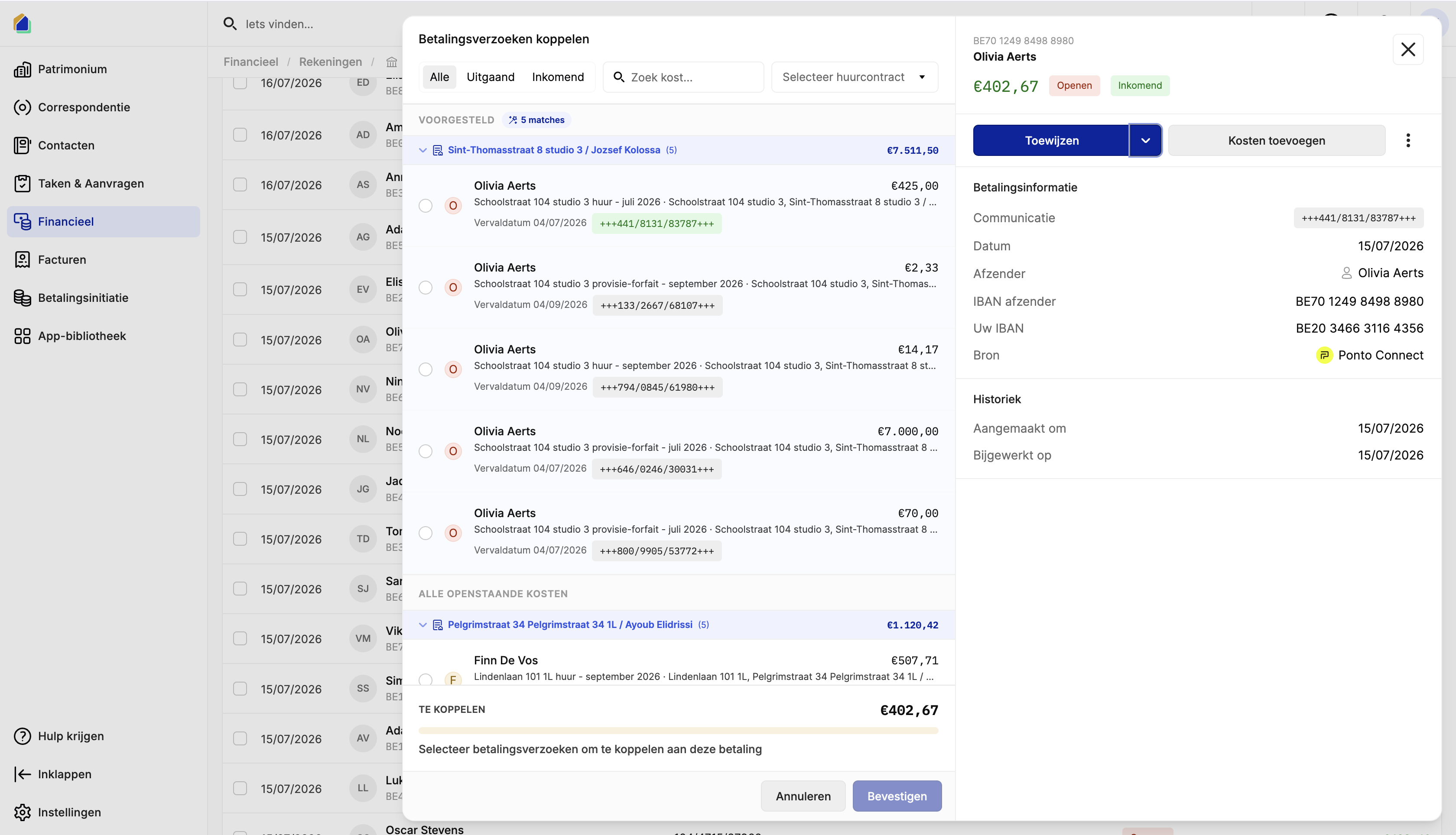
| Field | Description |
|---|---|
| Sender IBAN | Bank account of the sender |
| Sender name | Name on the transaction |
| Amount | Transfer amount |
| Status | Open (not yet assigned) / Incoming |
| Assign button | Main action to assign this payment |
| Add costs button | Add as a cost instead |
Accept an automatic suggestion
If the system finds potential matches, they appear under Possible matches. Each suggestion shows:
- Match percentage (e.g. 92%, 83%) — confidence score
- Description: property address + payment type + period
- Tenant name and due date
- OGM code highlighted in green when it matches the transaction
- Amount
If a suggestion has a high confidence score and the details match, click Accept matching to assign the payment instantly.
Confidence guide
- 90%+: safe to accept — OGM matched
- 80–89%: verify amount and sender name before accepting
- Below 80%: manual verification recommended
Manual assignment
If no automatic suggestion is correct, click the dropdown arrow next to Assign and select Link payment requests.
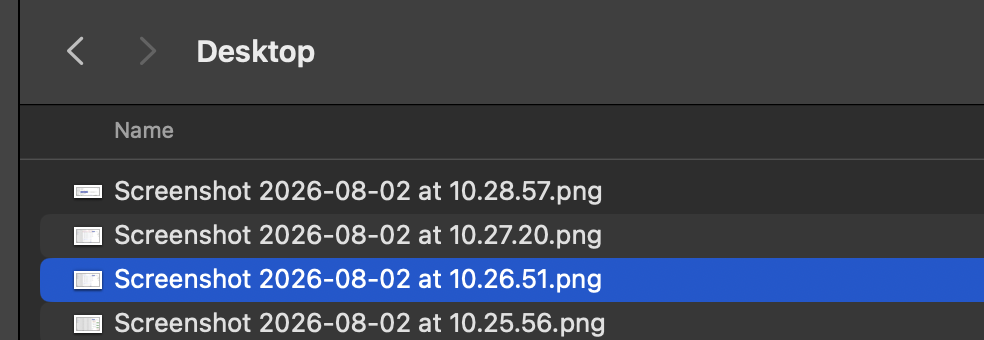
The dropdown offers:
- Link payment requests — assign to an existing payment request
- Link credit note — assign to a credit note
The assignment dialog
A dialog opens with suggested and open payment requests.
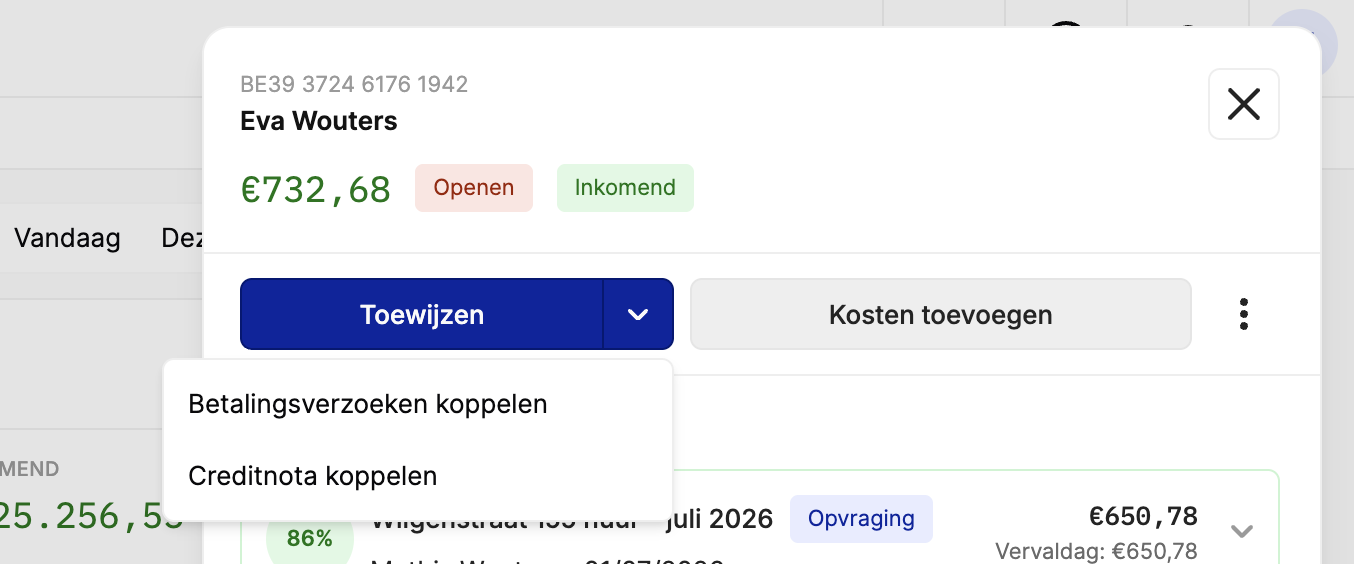
| Section | Description |
|---|---|
| Suggested | Top matches with confidence score, grouped by property |
| All open costs | All remaining unmatched payment requests |
| To link | Shows the remaining amount still to be assigned |
Each payment request shows the tenant name, property + type + period, due date, OGM code, and amount.
Filter by lease
Use the Select lease dropdown to quickly narrow down results by tenant or property.
- Click the Select lease dropdown.
- Type the tenant name or property address.
- Select the correct lease — the list filters to show only payment requests for that lease.
Complete the assignment
- Select the correct payment request(s) by clicking the radio button.
- The To link section updates with the selected amount.
- Click Confirm to complete the assignment.
OGM best practices
When you create a lease contract in SNDQ, you can either enter an existing OGM code the tenant already uses, or let SNDQ generate a new one automatically. Every period (month/quarter) uses the same OGM code for that lease.
- Reuse existing OGM codes if the tenant already has a standing order with a specific OGM — this avoids disrupting their payment habits.
- Communicate the OGM clearly to tenants at the start of their lease — include it on every payment request and in the lease contract.
- Remind tenants periodically if you notice payments arriving without OGM.
- Encourage standing orders with the correct OGM for automatic monthly matching.
Without OGM
When a tenant transfers without OGM, the automatic matching confidence drops significantly. The system falls back to amount + sender name matching, which often results in multiple possible matches requiring manual verification.
Good to know
- After assigning, the transaction status changes from Open to Assigned and the payment request is marked as (partially) paid.
- Assigned payments feed into owner payout calculations for the next settlement period.
- If the amount doesn't match exactly, assign it partially and leave the remainder open for later follow-up.
- Process assignments regularly (daily or weekly) to keep your accounts up to date.
Related articles
Need help?
Contact our team at info@sndq.be or use the Get Help option in the SNDQ application.